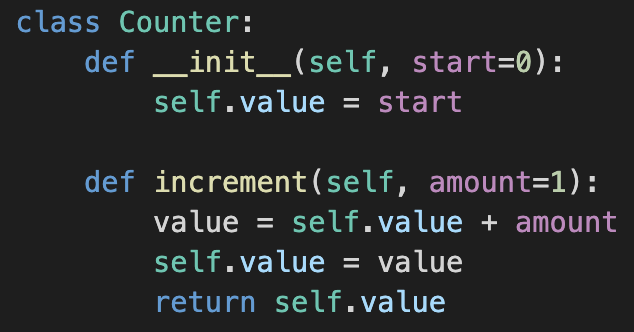
Code editors do more than just show plain text: they use color to turn raw source code into something your eyes can scan and your brain can parse quickly. In this post, you’ll meet two core ideas behind that magic—classic syntax highlighting, which colors code based on its surface structure (keywords, strings, comments, numbers), and semantic highlighting, which goes a step further and colors code based on what each symbol means in your program (like fields, parameters, and classes).
Together, these techniques make it easier to spot structure, notice mistakes, and follow important symbols through a file or project. To make this concrete, we’ll later walk through a short code example twice—first with only syntax highlighting, then with semantic highlighting layered on top—so you can see exactly how the extra semantic information changes what “colored code” communicates.
Syntax highlighting and code coloring
Code coloring and syntax highlighting are usually the same idea in everyday use: using color and style to visually distinguish different parts of source code. Code coloring is an informal term people use for the same feature, although syntax highlighting is the standard name in documentation and tools.
Syntax highlighting is a feature of editors and IDEs that assigns different colors and styles to categories of code such as keywords, strings, comments, numbers, and sometimes variables and function names.
Purpose of syntax highlighting
The main purposes are to:
- Make code easier and faster to read by visually exposing structure at a glance.
- Help spot mistakes (for example, a keyword colored like plain text hints at a typo, or a missing quote changes string coloring).
Key characteristics of syntax highlighting
Typical characteristics of syntax highlighting:
- It is based on the textual structure of the code (tokens like
if,"string",// comment), not deep understanding of the program. - It uses a limited set of categories (keywords, literals, comments, identifiers, punctuation, numbers, strings) mapped to colors/styles through a theme.
- It is usually fast and works even without a full compiler or language server, often driven by regex/tokenization rules.
Semantic highlighting
Semantic highlighting is a more advanced kind of code coloring that uses information from a language engine (like a language server or compiler) to color code based on its meaning in the program, not just its textual form.
Syntax highlighting and semantic highlighting are different concepts. Syntax highlighting looks only at surface-level syntax (tokens), while semantic highlighting knows things like “this is a class field,” “this is a parameter,” or “this is a variable from another file,” and can color those differently even if they look textually similar.
Purpose of semantic highlighting
The main purposes of semantic highlighting are to:
- Give more precise visual cues about the role of identifiers (e.g., fields vs locals vs parameters vs globals), improving navigation and code comprehension.
- Keep the same symbol consistently colored across its declarations and uses, helping track it through larger codebases.
Key characteristics of semantic highlighting
Common traits of semantic highlighting:
- It relies on parsing, symbol resolution, and type information from a language engine or server.
- It refines or overrides basic syntax highlighting, often adding distinctions like “mutable vs constant,” “declaration vs usage,” “class vs enum,” etc.
- It can be more accurate but may depend on the project compiling or the language tools being available.
Syntax vs semantic highlighting overview
| Aspect | Syntax highlighting | Semantic highlighting |
|---|---|---|
| Basic idea | Colors code based on surface syntax tokens | Colors code based on symbol meaning and context |
| Typical implementation | Tokenization/regex rules and theme mappings | Language server or compiler plus theme mappings |
| Knowledge of the program | Knows token types (keyword, string, comment, etc.) | Knows symbols (fields, params, locals, types, etc.) |
| Setup/dependencies | Works with just editor rules | Requires language support (server, analyzer, project) |
| Main benefits | Readability, quick structure recognition, typo hints | Deep understanding of roles, consistent symbol coloring |
| Common terminology | “Syntax highlighting”, “code coloring” | “Semantic highlighting”, “semantic coloring” |
Syntax and semantic highlighting: an example
Let’s use a simple Python snippet and see the differences between raw code, syntax-highlighted and semantic-highlighted code: Let’s look at the raw code first:
# Small example to show syntax vs semantic highlighting categories
import math
from statistics import mean

MAX_COUNT = 100      # constant
GLOBAL_OFFSET = 5   # global variable

class Counter:
  # Class property (field) with a default value
  factor = 2

  def __init__(self, start=0):
    # Instance property
    self.value = start

  def increment(self, amount=1):
    new_value = self.value + amount
    self.value = new_value
    return self.value

  def scaled_value(self):
    # Use a module function and a class property
    root = math.sqrt(self.value + GLOBAL_OFFSET)
    return root * self.factor

def summarize_counts(values):
  # Top-level function using a parameter, local variable, and a module-level function
  clipped = [min(v, MAX_COUNT) for v in values]
  avg = mean(clipped)
  return avg
Now, let’s take the code and use syntax highlighting. With syntax highlighting only, editors will typically color keywords, comments, string and number literals. For example, class, def, return, import, from, min, for, in as keywords, strings and numbers as literals, and everything else (like value, self, increment, amount) as generic identifiers:
# Small example to show syntax vs semantic highlighting categories
import math
from statistics import mean

MAX_COUNT = 100      # constant
GLOBAL_OFFSET = 5   # global variable

class Counter:
    # Class property (field) with a default value
    factor = 2

    def __init__(self, start=0):
        # Instance property
        self.value = start

    def increment(self, amount=1):
        new_value = self.value + amount
        self.value = new_value
        return self.value

    def scaled_value(self):
        # Use a module function and a class property
        root = math.sqrt(self.value + GLOBAL_OFFSET)
        return root * self.factor

def summarize_counts(values):
    # Top-level function using a parameter, local variable, and a module-level function
    clipped = [min(v, MAX_COUNT) for v in values]
    avg = mean(clipped)
    return avg
Now, with semantic highlighting enabled, the same code additionally shows:
Counteras a classincrement, __init__, scaled__valueas methodssummarized_countsas a functionfactorandvalueas class properties, fields or attributesstart,amountandvaluesas method or function parametersnew_value, root, clipped, avgas local variables- Imports and modules (
import,from,math,statistics) - Global variable (
GLOBAL_OFFSET), constant (MAX_COUNT).
# Small example to show syntax vs semantic highlighting categories
import math
from statistics import mean

MAX_COUNT = 100      # constant
GLOBAL_OFFSET = 5   # global variable

class Counter:
    # Class property (field) with a default value
    factor = 2

    def __init__(self, start=0):
        # Instance property
        self.value = start

    def increment(self, amount=1):
        new_value = self.value + amount
        self.value = new_value
        return self.value

    def scaled_value(self):
        # Use a module function and a class property
        root = math.sqrt(self.value + GLOBAL_OFFSET)
        return root * self.factor

def summarize_counts(values):
    # Top-level function using a parameter, local variable, and a module-level function
    clipped = [min(v, MAX_COUNT) for v in values]
    avg = mean(clipped)
    return avg
With no coloring at all, the Counter class is just a block of uniform text where keywords, parameters, fields, and locals all visually blur together, so understanding relies entirely on mentally parsing the characters. With syntax highlighting, keywords like class, def, and return, as well as numbers and maybe strings, stand out in different colors, which makes the basic structure of the snippet clearer but still treats all identifiers (such as Counter, value, start, amount, and self) as essentially the same. With semantic highlighting, the same snippet gains an extra layer of meaning: Counter is colored as a class, __init__ and increment as methods, self.value as a field, start and amount as parameters, and value as a local variable, so you can immediately see not just where things are in the code, but what role each piece plays.
Semantic highlighting details
Coloring min and mean differently
minis a built‑in function in Python, so many highlighters classify it as a “built‑in symbol” rather than as an ordinary user‑defined function. Built‑ins are often mapped to a separate color (commonly a blue‑ish tone) so they stand out as “provided by the language/runtime.”meanin our example comes fromfrom statistics import mean, so the editor treats it as a regular function symbol defined in a module, not as a built‑in. That token type is usually mapped to the generic “function/method” color in the theme (often yellow in dark themes).
In semantic highlighting terms, that means:
minmight be tagged as something like “built‑in function” or “library support function,” which your theme colors blue.meanis tagged as a normal function symbol coming from your imports, which the same theme colors in the “Function/Method” color family (yellow).
Constants and global variables
MAX_COUNT and GLOBAL_OFFSET are both just variables at the language level, but the highlighter infers that they play different roles, so it assigns them different semantic categories and therefore different colors. Many tools/themes treat these two patterns differently:
- MAX_COUNT is written in ALL_CAPS, which is a very common convention for “constants.” Some semantic systems or themes detect all‑caps names and style them as constants or “readonly” values, giving them a distinct color to say “this is meant to be fixed.”
- GLOBAL_OFFSET is also at module scope but does not necessarily look like a constant to the highlighter, so it is often tagged as a regular global variable and colored with the generic variable color.
In other words, the color difference is not about scope (they are both module‑level) but about the intended usage that the tool infers: one is treated as a constant, the other as a mutable global. Some themes use this to visually warn you when you are touching globals, or to make true constants stand out from values that might change.
Basic categories used for coloring
The exact colors depend on the theme, but the categories and roles are what matter for semantic highlighting.
- Comments: Notes for humans that the interpreter ignores, often used to explain code or leave TODOs (in Python, everything after
#on a line). - Language keywords: Reserved words that have a special meaning in the language (for example,
class,def,return,if,for); they form the basic building blocks of syntax. - Operators: Symbols that perform operations like arithmetic, comparison, or assignment (for example,
+,-,*,==,=,and), connecting values and expressions. - String literals: Pieces of text written directly in the code between quotes (for example,
"hello"or'world'), representing constant string values. - Number literals: Numeric values written directly in the code (for example,
0,1,3.14), representing fixed integer or floating‑point values. - Class names: Identifiers that name a class, like
Counterin the example, usually colored distinctly to mark “type-like” symbols. - Class methods: Functions defined inside a class (such as
__init__orincrement), usually colored as methods to show they belong to a class rather than being free functions. - Class properties / fields / attributes: Values stored on an instance or the class itself (like
self.value), often given a specific color to distinguish them from local variables and parameters. - Local variables: Variables defined inside a function or method body (like
valueinsideincrement), whose lifetime is limited to that block and often given their own color in semantic highlighting. - Parameters: Variables that appear in a function or method definition’s parameter list (like
startandamount), sometimes colored differently from locals to show that they are inputs. - Global variables / module-level variables: Names defined at the top level of a file, outside any function or class, which can be accessed from multiple places in that module; some semantic schemes give them a distinct style to warn that they are broader in scope.
- Functions (top-level): Named callables defined outside classes (for example,
def helper(...):at module level); semantic highlighting can color them differently from methods to show they are not bound to a class. - Constants / enums: Identifiers meant to represent fixed values (often written in all caps), sometimes colored differently as read‑only data.
- Imports / modules: Names that refer to imported modules or symbols (for example,
import math), sometimes highlighted to show they come from elsewhere. - Namespace / package names: Higher‑level containers for modules or symbols, occasionally given their own color in large codebases
Conclusion
Understanding the differences between no coloring, syntax highlighting, and semantic highlighting is not just an aesthetic exercise; it is a way to be more intentional about how tools support your thinking while you read and write code. Once you start noticing what each layer gives you—whether it is basic structure, quick error spotting, or a deeper sense of how symbols relate across a file—you can choose editor settings and themes that match how your brain works best, instead of sticking with whatever the default happens to be. The hope is that, after this post and the Counter example, you will look at your own editor with fresh eyes and maybe tweak its highlighting so that the colors on your screen genuinely help you understand your programs, rather than just decorating them.
Leave a Reply